Free Current State Analysis

    Your architects walk in with the work already found.

    Pick one Azure environment you manage or want to win. A Well-Architected review, ranked by impact and effort.
    For MSPs and cloud providers: one client environment you manage, or a customer you're trying to win. Ten a month, so Jay can read every set of findings himself.
    Jay Strydom
    Jay Strydom
    reviews the findings
    Working with cloud and MSP teams
    Umbrellar Technology Group Crayon, a SoftwareOne company Lexel Deptive
    What you get back

    The report you get, section by section

    • Executive summary and annual value. The main findings for this environment, with the annual value, on the first page.
    • Spend and savings outlook. The current run rate alongside the savings available, with a 12-month net cashflow projection.
    • Impact-and-effort matrix. A read on the environment as it stands, with the findings plotted so you can weigh what's worth doing against what it takes to deliver.
    • Quick wins. The low-effort findings you can act on straight away.
    • Cost and security posture. Where spend is running ahead of what the environment uses, how the security posture stands, and where the risk is concentrated.
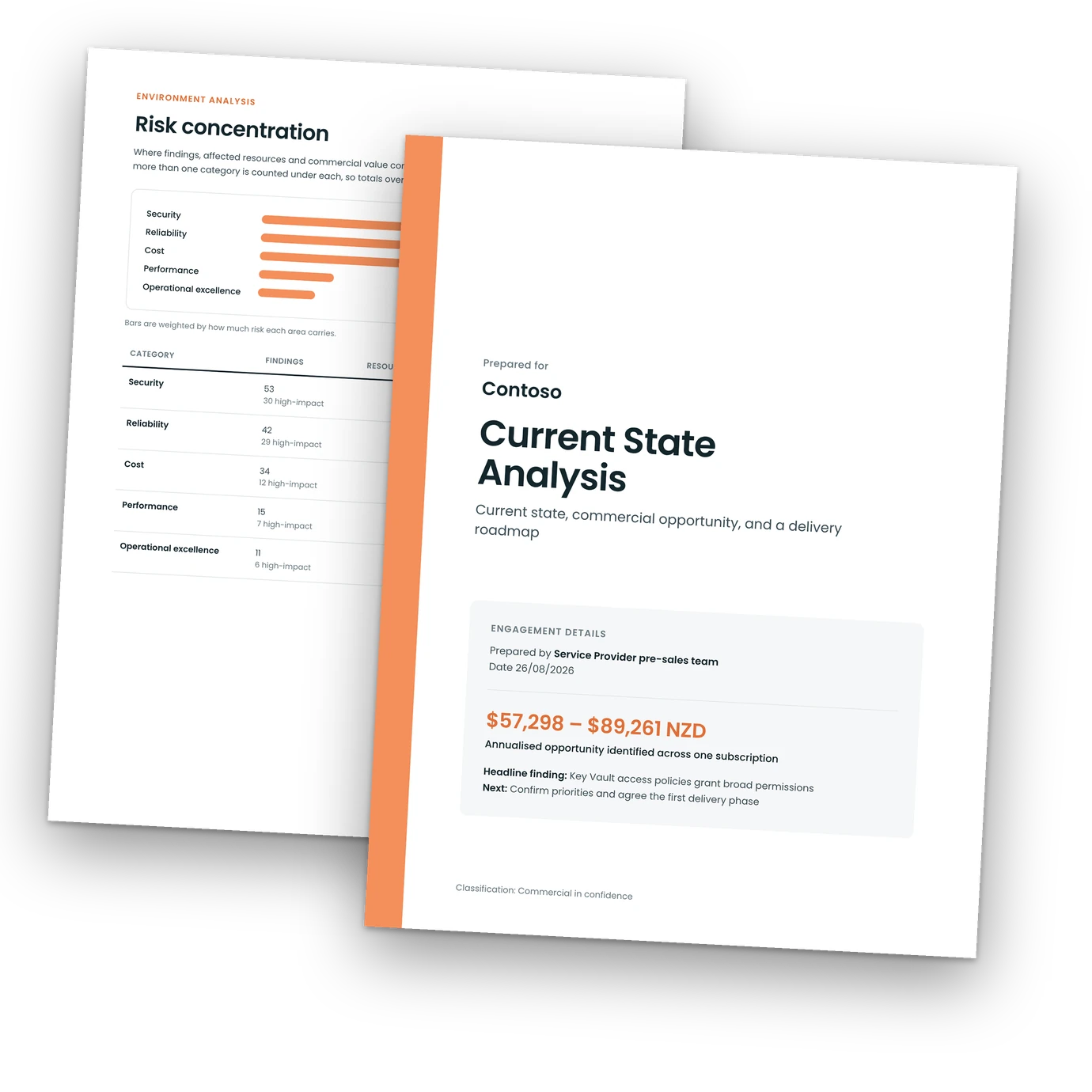
    The cover of a Current State Analysis report, prepared for a client, with the service provider's own name on it.
    Report cover
    The Environment Analysis page of the report, showing where risk concentrates across the environment.
    Environment analysis
    Two pages from the full report: the figures come from a demo environment, and right alongside the findings, the report states how much of the environment it could read.
    It's one document: the work, what it takes to deliver, and how the environment stands today. Alongside it, a walkthrough in the Spotto platform where you can ask about anything. You take the report into the next meeting and show them their environment is being actively looked after.
    How it works

    One Azure environment, from first look to the conversation

    1

    Pick one environment

    Choose one Azure environment you want to look at more closely: one you manage today, or one you're working to win. A good pick is an environment with more billable work in it than you've had time to find.

    2

    Spotto reviews the environment

    With read-only access, Spotto looks at the environment and highlights the work that matters. Jay Strydom reviews what comes back.

    3

    You get walked through the environment

    Review the environment with Spotto and Jay Strydom. See how it's tracking and spot the opportunities, then ask anything and get a clear answer.

    The Current State Analysis covers the same ground in writing, ranking findings by impact and effort, with a clear path through them.

    4

    You take it into the conversation

    Share the key points with the client or prospect. It's written in client-friendly language, so the person approving the work can see what they get from it.

    In practice

    "Spotto hasn't changed what we deliver, it's changed how fast and how proactively we can deliver it. What used to take weeks to surface manually, we're now seeing in days. That means better conversations with our customers, faster action, and real, measurable outcomes."

    Luke Golds · CTO, Umbrellar
    Shown with Umbrellar's sign-off.
    US$6,000–10,000
    of optimisation work every month, in Umbrellar's own words.
    Questions

    Well-Architected review FAQ

    What is a Well-Architected review?
    A Well-Architected review is a structured assessment of an Azure environment against the five pillars of Microsoft's Well-Architected Framework: Reliability, Security, Cost Optimization, Operational Excellence and Performance Efficiency. It surfaces where the environment is strong and where there is high-impact work worth doing. In this offer, Spotto runs that review on one of your client environments and Jay Strydom reads the findings. From there, you go through the environment in the Spotto platform with Jay, and you take the Current State Analysis into your client conversation.
    We already use Azure Advisor and Defender for Cloud. What does this add?
    Azure Advisor and Defender for Cloud do a lot of this well, and the review works alongside them. Every finding carries an impact rating and an effort rating, so you can weigh what is worth doing against what it takes to deliver. Every finding also reads two ways: a technical view of what needs to change, and a business view of why the outcome matters to your client. That gives you the words for the client conversation as well as the ticket. Jay Strydom reads the findings on your client's environment. Once you have picked the work, Spotto groups the recommendations you choose into delivery packages and drafts a statement of work covering scope, assumptions and acceptance criteria. You finish it and price it on your own commercial terms.
    Is it really free?
    Yes. One review per MSP, on one client environment of your choosing. No cost, and no card. It's free because it shows you what Spotto does in a real environment, with no obligation to go further afterwards.
    What do I need to give you access to?
    Reader access to the Azure subscriptions in the one client environment you choose. You invite someone from the Spotto team as a guest in the tenant and assign them the Reader role at the scope you pick, so the subscriptions you grant are the only ones the review can see. Reader shows how resources are configured. It cannot create, change or delete anything. It cannot open the data stored inside those resources either, so blob contents, Key Vault secret values and database rows stay out of reach. There is no ongoing connection. When the review is done, you remove the role assignment and the access ends. You grant it in your own Azure portal on a setup call, with our guidance, so you and your client see the exact scope before anything begins. For the full picture on access and data handling, read how Spotto keeps your clients' clouds safe.
    How long does it take?
    You grant access on a setup call, with our guidance. Spotto reviews the environment. You get the Current State Analysis in writing, and a walkthrough of the environment in the Spotto platform. How long that takes depends on the size and shape of the environment, so you'll get a realistic timeframe for your client when we speak.
    What does the report look like?
    Email [email protected] and we'll send you an example report.
    What do I do with the report?
    It is your read on that one environment: the opportunity, the work ranked by impact and effort, and a roadmap. Use it to shape the conversation and the work you take to the client.
    Which clients is it best for?
    It works best on a client where the environment is bigger than the time you've had to dig into it, and where a clear, prioritised view would help you have that next conversation. One well-chosen environment tells you more than a rushed look across several.
    Get started

    See the top priorities in one Azure environment
    Pick one environment, and you get a walkthrough of it in the Spotto platform and the findings in writing. Free, and yours to take into the next meeting.
    You grant read-only access for the review, there's no ongoing connection, and nothing in the environment changes.
    • One client environment, covering all five key areas
    • A walkthrough of that environment in the Spotto platform
    • The Current State Analysis in writing, findings ranked by impact and effort
    Request your free assessment
    Limited to ten free reviews a month
    For MSPs, cloud providers and IT partners who manage Azure on behalf of clients. The environment you pick belongs to someone else: a client you look after, or a customer you're trying to win. If the Azure you manage belongs to your own organisation, talk to us about Spotto instead. Get in touch.

    The request form is not loading. Some ad blockers and DNS filters stop it. Email [email protected] and we'll set your assessment up from there.

    One review per MSP, no cost. You'll get a quick call to set things up. By requesting, you agree to our review terms.